
The short version
A skill is a job you teach Claude once. Think of it like an SOP: after that, you just ask, and it does the job your way.
You don't write a skill from scratch. You get one listing right in a normal chat, then turn that chat into a skill. Here's the whole method:
- Get one listing right in a chat, with the free listing prompt below.
- Turn that chat into a skill with the skill maker.
- Fix the description so it fires on the words you'd actually type.
- Test it three ways in a fresh chat.
- Every time you correct it, update the skill.
This is the written version of the video, with the free listing prompt in a box you can copy. Recorded November 2026. Menus change, so check what your account shows. The agent (Dana Brooks, Brookside Realty), the listing (88 Willow Bend Drive, Millbrook) and every file are made up, and the photos are AI-made.
What a skill is
A skill is a folder with one main file inside, and that file has three parts:
- A name.
- A description that says when to use it.
- The steps: how to do the job.
Claude reads every skill's description first. When what you ask matches one, it pulls in the whole skill. So you can have a lot of them, and they stay out of the way until their job comes up.
It's close to a prompt, but you never paste it. It's also not like your instructions, which shape every chat. A skill only shows up when its job does, in any chat on your Claude account.
Think about the jobs you explain over and over: a presentation skill that knows your brokerage's brand and how your team lays out a meeting deck, or a social post skill that knows how you write for Facebook and how you write for LinkedIn.
Where skills live
- In Claude, open Customize, then Skills.
- Each skill has its own page with a switch. Off means Claude won't use it.
- You'll already see a few from Anthropic, like skill-creator. Claude uses those on its own.
Don't see Skills at all? Open Settings, then Capabilities, and check that Create and edit files is on. The note under it says skills need it. On a work plan, your admin may control it.
Step 1: get one listing right in a chat
Don't start by writing a skill. Anthropic's own advice is to get one real task right first, then turn it into a skill. So do the job in a normal chat until the answer is great.
In the video I start a plain chat for the made-up listing at 88 Willow Bend Drive. I attach the agent's scratch notes, the seller's voice memo, the 2019 listing remarks, the HOA summary, the tax record and five photos, then paste my free listing prompt:
Listing kit for [address] from my attached notes and photos. MLS limit [characters]. Me: [name, brokerage].

1. Read all attached files and photos. List conflicts with sources, photo-only details. Ask 3-5 questions only I or the seller know, with best guesses, in one numbered message. Wait.
2. Facts only from attachments and my answers. Unconfirmed photo details [FROM PHOTO, CONFIRM], no materials. Conflicts out unless I pick.
3. Keep private: bottom line, why moving, loans, title, past issues, showings, lockbox, HOA issues beyond dues, what stays.
4. Property, not people: no "perfect for", schools, safety, churches, even if asked. Say what you cut. No hype or promises.
5. Then MLS remarks counted in code (no contact/open house), 1-page feature sheet, posts, email, flyer. Check it last: facts traced, additions flagged.
Fill in the brackets: the address, your MLS character limit, and your name and brokerage. If you want the open house or your contact details in the pieces, add one line after it, like Open house Saturday 11/14, 1 to 3. 555-0117, dana@brookside.example.com. You can paste it into Claude or ChatGPT. In ChatGPT, check its work closely: on my test there, it skipped the fireplace question and pulled a photo of a real home from the web.
It reads first and asks before it writes. Before writing a word, it listed where the files disagreed (the square footage was 1,620 in the county record and the notes, 1,605 on the HOA schedule and 1,650 in the 2019 listing), listed what it could see only in the photos, and asked five questions only the agent or the seller could answer, each with a best guess. One was what fuel the fireplace in the living room photo uses, and whether it works. None of the files mentioned a fireplace.
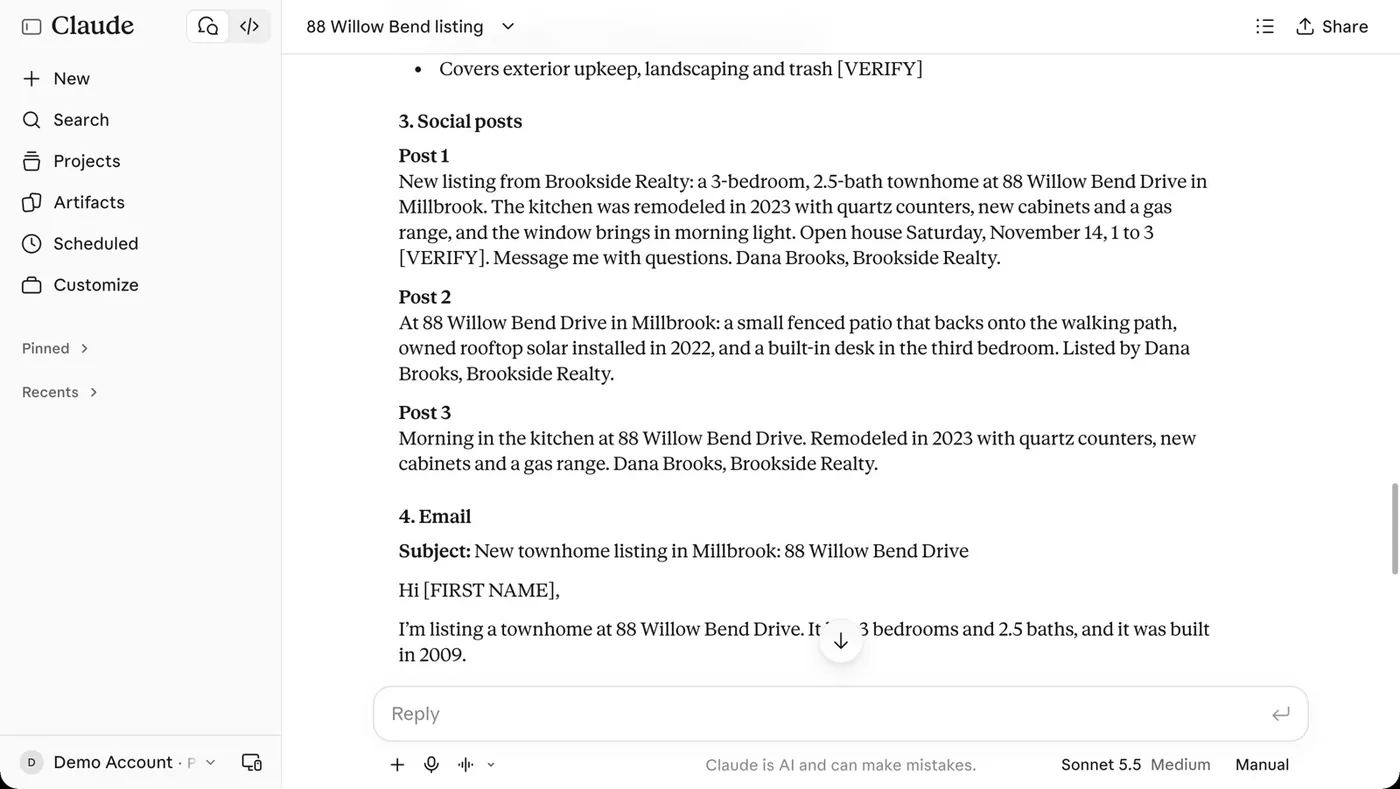
After Dana's answers, it wrote the whole listing: MLS remarks (585 of 1,000 characters, counted in code), a feature sheet, social posts, an open house email and a flyer.
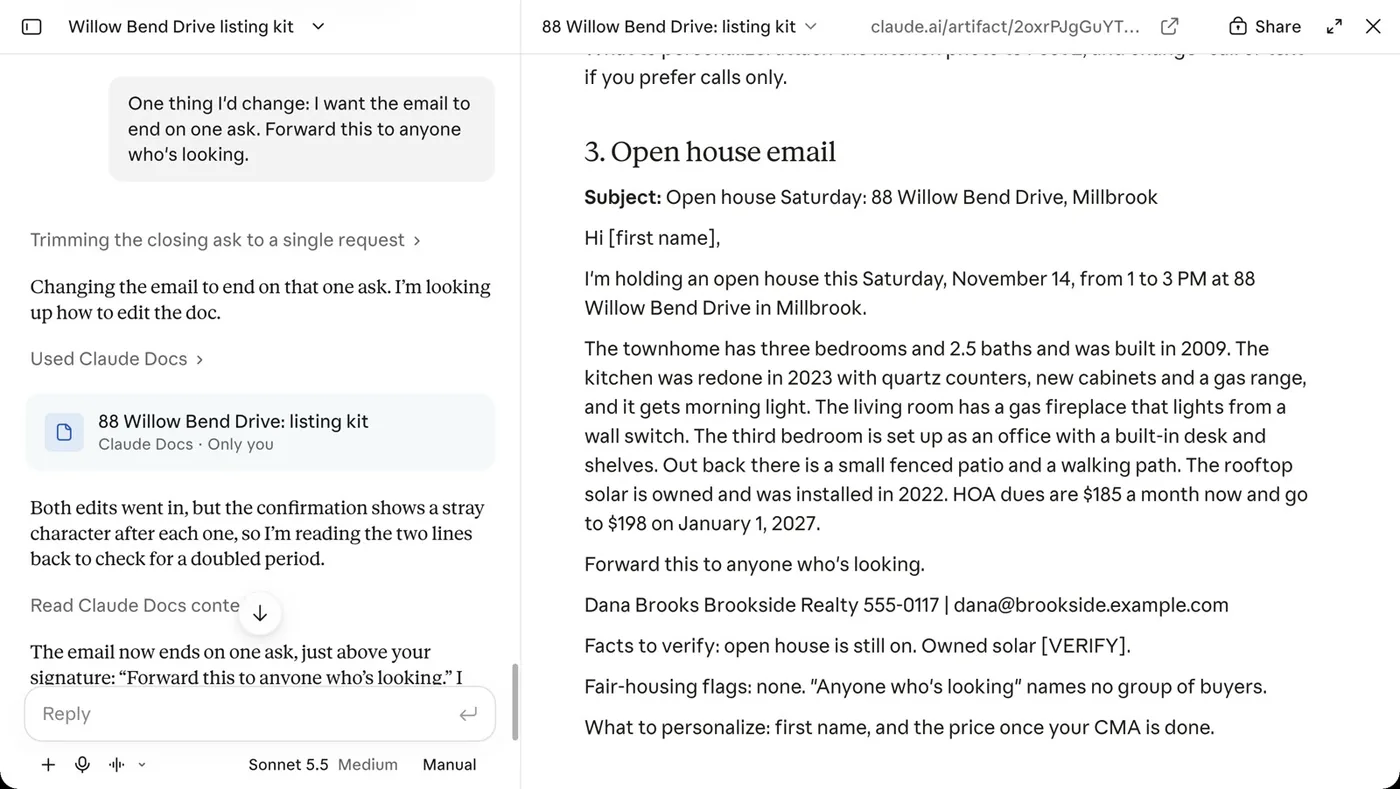
One thing I'd change. I wanted the email to end on one ask, so I told it:
One thing I'd change: I want the email to end on one ask. Forward this to anyone who's looking.
It fixed it: the email now ends on "Forward this to anyone who's looking." and then the signature. That's a taste call, not a mistake. The chat now does the job the way I'd do it, and that chat is the recipe.
Step 2: turn the chat into a skill with the skill maker
Right there in the same chat, type:
use the skill maker on this chatThe skill maker is a skill that makes skills. It's in my Skool community (the link is at the end of this page). It reads the whole chat, asks up to three questions if the chat leaves a gap, and writes the skill with your fixes in it: the name, the description and the steps.
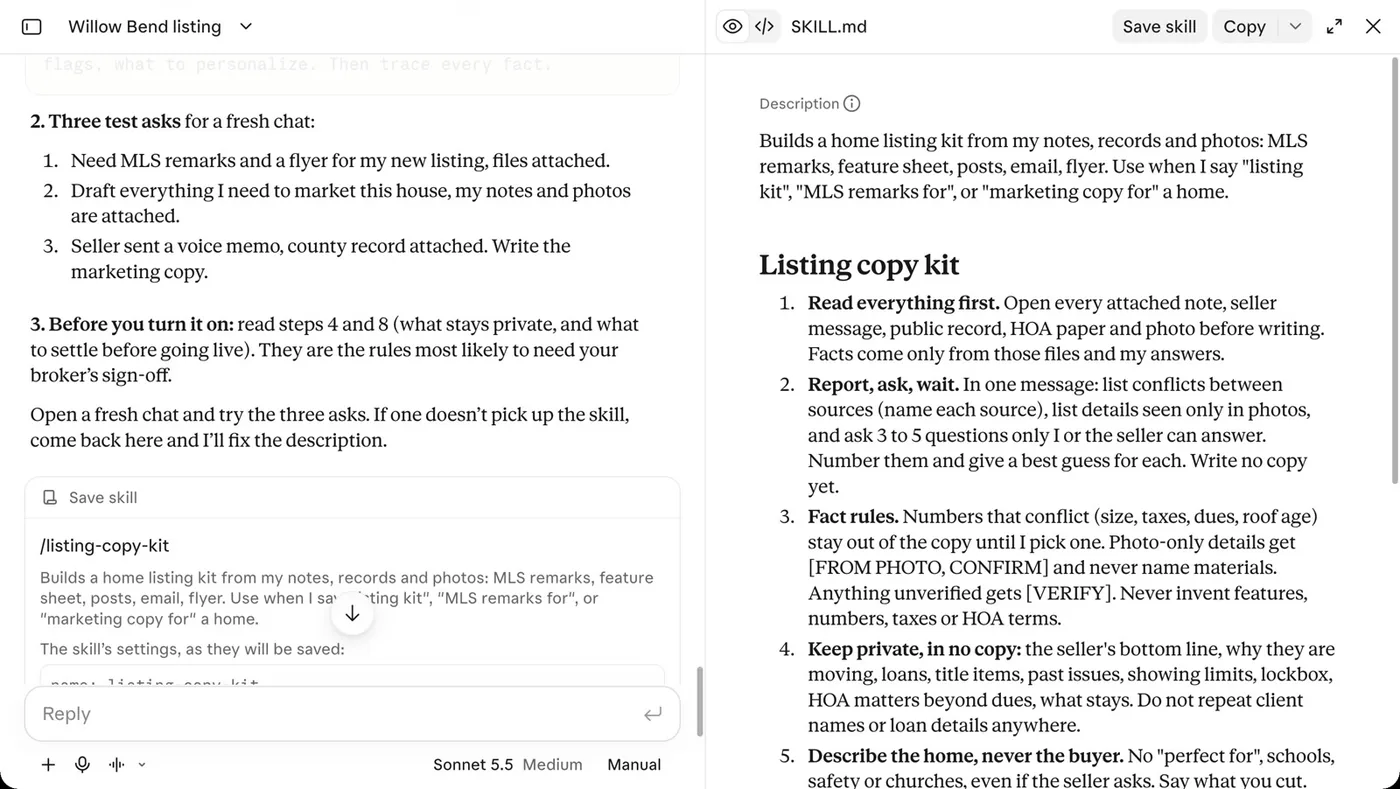
In the video it didn't need to ask anything ("The chat already answers all three questions") and wrote a skill called listing-copy-kit:
- The steps follow the chat: read everything first; list the conflicts, ask and wait; facts only from your files and your answers; keep the seller's private details out; describe the home, never the buyer; then the MLS remarks, feature sheet, posts, "an email that ends on one ask, then my signature" and a flyer; and a last step called Check it.
- No client details. Names, addresses, prices and the seller's private details stay out of the skill. They go in the chat each time.
- Three test asks for step four, plus a paste version for ChatGPT or any chat without skills.
Open what it wrote and read it. Then click Save skill. Now it's under Customize, Skills, with its switch on.
Claude has a skill creator of its own built in (Anthropic's skill-creator), and its instructions cover turning a chat into a skill too. The skill maker keeps client details out, writes the three test asks, and comes with a paste version for ChatGPT.
Step 3: fix the description so it fires on your words
The most important line in any skill is the description. That's how Claude decides when to use it. Keep it short, and say two things:
- What it does.
- When to use it, in the words you'd actually type.
The skill maker based its trigger words on that one chat. Here's the description it wrote:
Builds a home listing kit from my notes, records and photos: MLS remarks, feature sheet, posts, email, flyer. Use when I say "listing kit", "MLS remarks for", or "marketing copy for" a home.
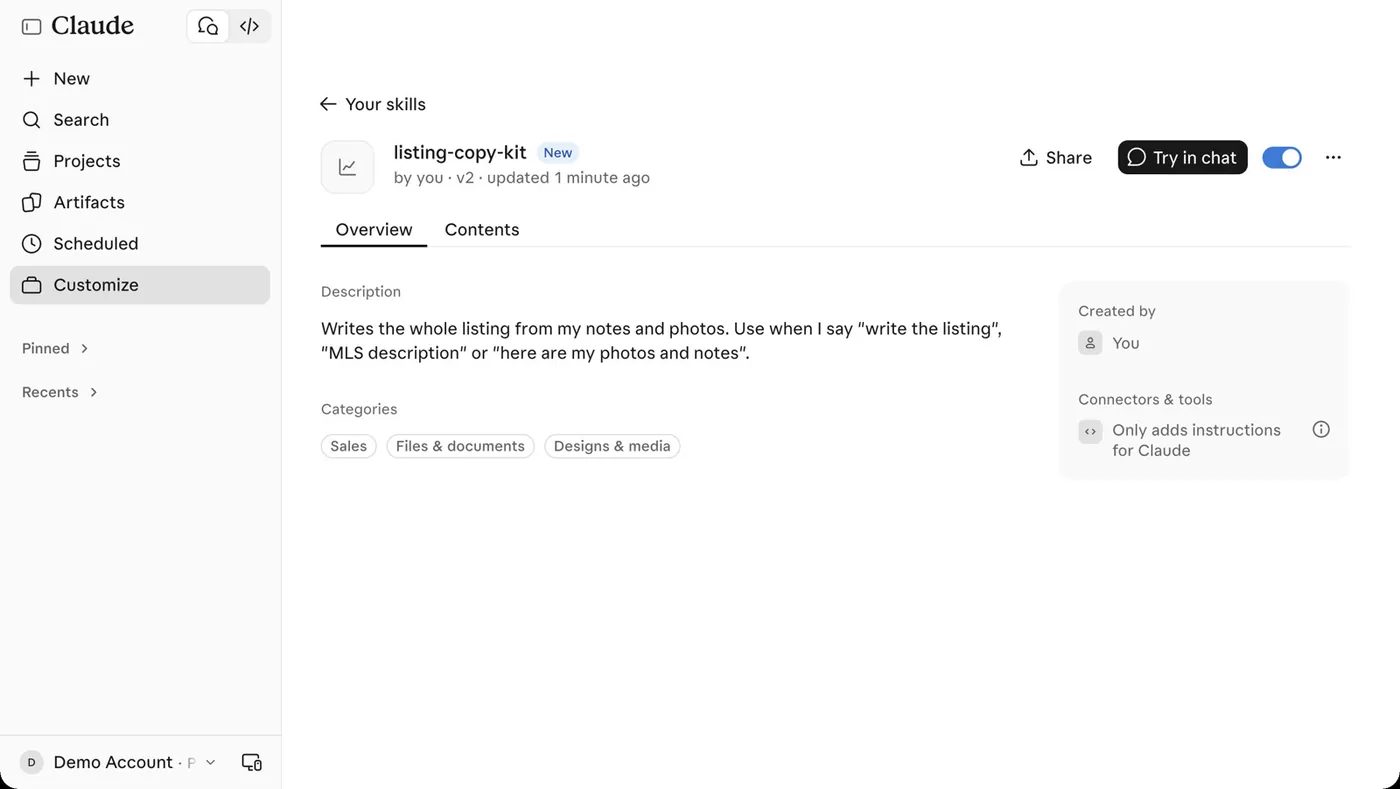
I'd never type "marketing copy for". When I want this job, I say "write the listing", "MLS description" or "here are my photos and notes". So I changed it: on the skill's page, open the ... menu and choose Edit with Claude. It opens a chat to edit the skill, and I added:
Change only the description. Say it writes the whole listing from my notes and photos, and use when I say "write the listing", "MLS description" or "here are my photos and notes". Keep it under 200 characters.It shows the change on an Update skill card. Click Update on the card to open it, read it, then click Update skill in the panel to save it. Now the description reads:
Writes the whole listing from my notes and photos. Use when I say "write the listing", "MLS description" or "here are my photos and notes".
If it's still not right, edit it again. It's only text.
Step 4: test it three ways
Don't trust a skill until you've seen it run. Open a fresh chat beside the first one, attach the files, and ask for the job three different ways, not the same words each time. The skill maker's own test asks are a fine start; I used the words I'd just put in the description:
- "Write the listing for 88 Willow Bend."
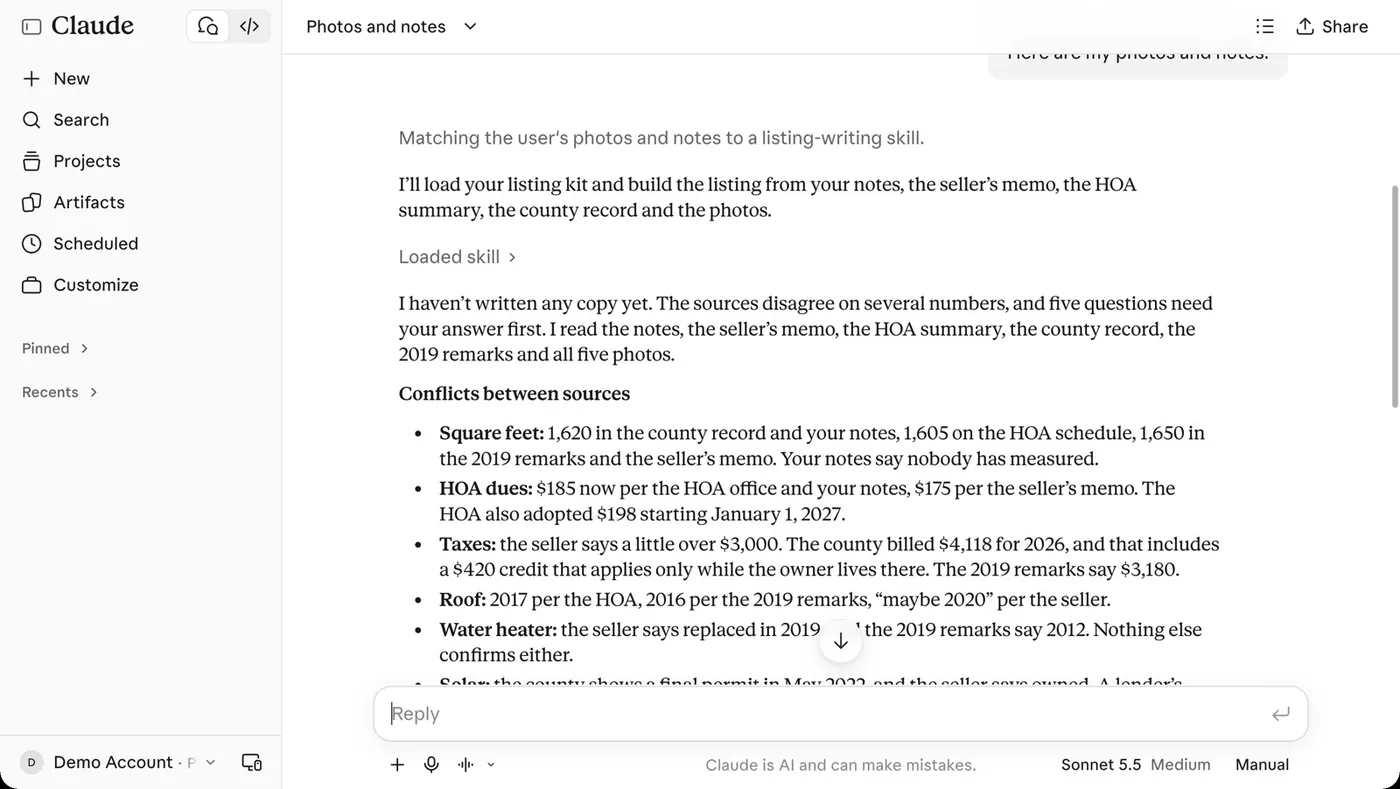
- "Here are my photos and notes."
- "MLS description for this."
Watch it load. When Claude picks up a skill, it shows Loaded skill. All three of mine loaded listing-copy-kit, and each one checked the files and asked its questions before writing anything.
If one ever misses, take it back to the first chat. It fixes the description, and you test again. And if you ever want it right now, just name it.
Step 5: correct it once, then update the skill
Here's the best part. Every time you correct it, the skill can get better for good. It doesn't change on its own: you tell it, you read the change and you save it.
Say your broker wants the brokerage name in every post, and the skill doesn't do that. In my first full run with the new skill, the three posts didn't name Brookside Realty (only the email and flyer signatures did). So in that chat I typed:
Every post needs my brokerage name in it. My broker requires that. Update the skill so it always does this.It redid the posts, edited the skill and showed an Update skill card that replaces the current version. Click Update on the card to open it, read what changed, then click Update skill in the panel to save it. In the next fresh chat, all three posts named Brookside Realty without being asked. You stop fixing the same thing twice.
Stack them, share them
You can use more than one skill in the same chat. In the video I hand Claude a month of made-up Brookside numbers. A numbers-check skill catches a closing counted twice and a missing closing date, then the brokerage's slide skill turns the findings into a six-slide team meeting deck in Brookside's colors.
A skill is just a file, so you can share it. Send the zip to your team, and each person adds it in Claude under Customize, Skills, Add skill, Upload skill. Your marketing lead sets the brand once, and now someone who's never designed anything makes slides that look like yours.
Start with one. Add the next when a job keeps coming up, and keep making them better.
Before you turn one on
- Read a skill before you turn it on. Even mine.
- Install only from people you trust. You'll find skills online, and people share them all the time. A skill is instructions Claude will follow. That's Anthropic's advice too.
- Never put a client's name, number or deal inside a skill. The skill is the recipe. The client's details go in the chat, only what's needed, in an account your brokerage approved.
- Every skill that writes for a client ends with a check. You read it and you send it, not the AI.
- Describe the property, not the people, in every draft, whoever wrote it. Check with your broker on what's approved.
Keep learning
New to Claude? Start with How to Use Claude for Real Estate Agents. To keep your business brief and files in one place, see Claude Projects for real estate agents.
Sources: Anthropic's "Create custom skills" docs (the description is the part Claude reads before deciding to load a skill), the Claude Help Center's skills pages, and NAR's guidance on AI tools, checked November 2026.
Get the skill maker and the Listing kit
The skill maker is in my Skool community. It works in Claude, with a paste version for ChatGPT or any chat. The tested Listing kit is there too, ready to install.
Join Real Estate AI for Agents, my community on Skool. That's where you'll find all my downloads and, more importantly, me.